
Chess Review MCP: AI Chess Coach
Published:
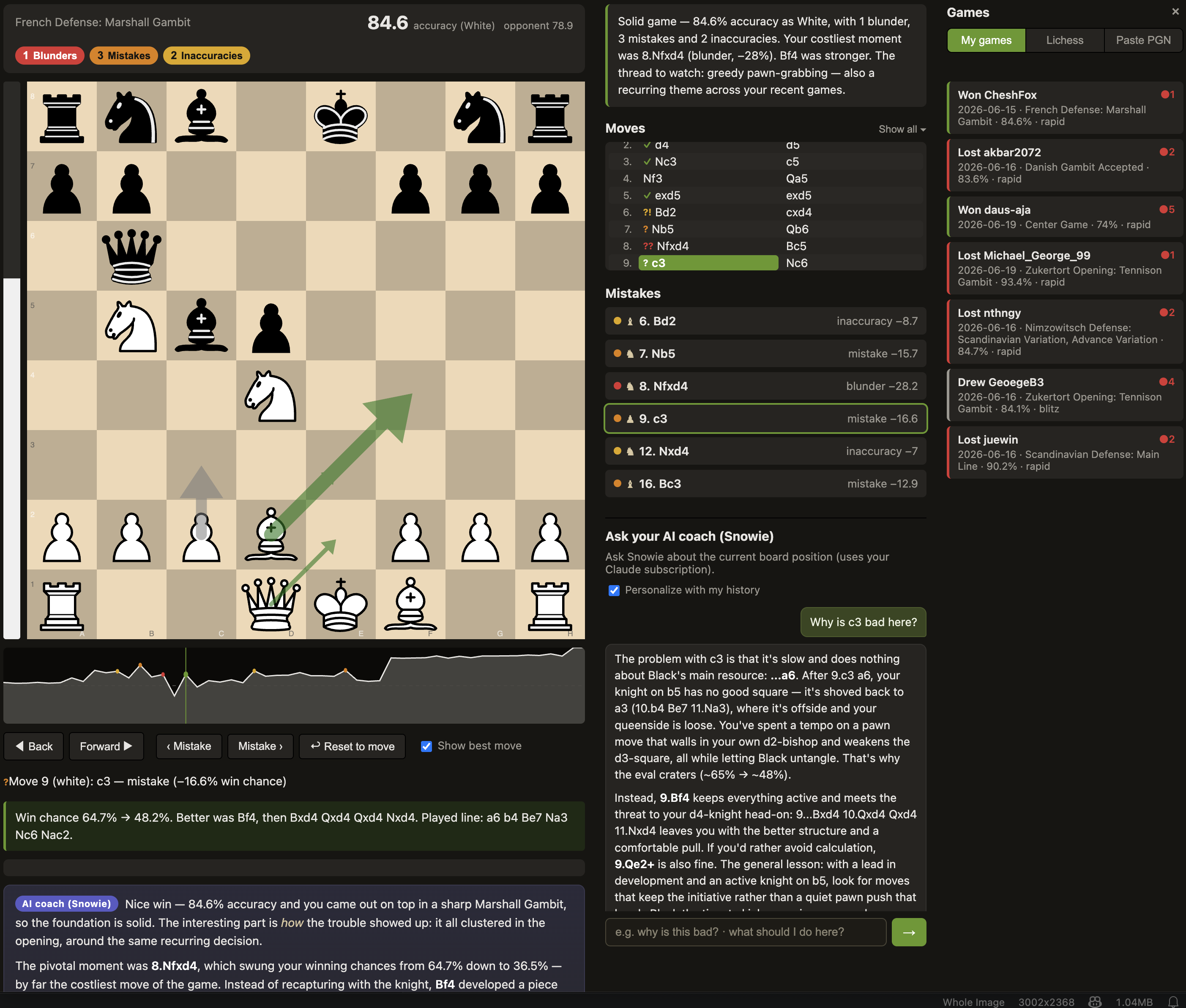
Chess Review MCP is a chess coach you can talk to that doesn’t make things up: ask why a move was a mistake or what you should have played, and you get a straight answer in words, grounded in real Stockfish lines rather than guessed. That grounding is the whole point of the project, and most of the engineering below exists to make it true. The app itself is polished and easy to use, so this write-up is less about the feature tour (the project website covers that) and more about what I had to understand and build to get an LLM to coach chess without hallucinating.
The core problem: making an LLM coach without lying
A language model asked to explain a chess position will happily invent plausible-sounding lines that are simply wrong. My approach was to never let the model reason about chess on its own. Instead, the backend runs a full Stockfish engine analysis first and turns it into a set of hard facts for each move: the evaluation, the engine’s best line (multi-PV with progressive deepening), and the concrete refutation of what was actually played. The model’s job is only to put those facts into plain words, not to decide what is good or bad. This is the same idea as retrieval-augmented generation, but the retrieved “documents” are a deterministic engine’s output, so the explanation is anchored to something that cannot be argued with. Learning where the model was allowed to add value (phrasing, motif naming, teaching tone) versus where it had to stay on rails (any concrete claim about the position) was the central design lesson of the project.
Classifying mistakes taught me the difference between raw centipawn evaluation and how much a move actually costs you. Rather than flag moves by centipawn swing, the review converts evaluations to win probability and thresholds on the drop, the same style Lichess uses, so a blunder in a already-lost position is not treated the same as one that throws away a win.
One process, two interfaces, one source of truth
The app runs two ways that must never disagree: as an MCP server inside the Claude Code terminal, and as an interactive web board in the browser. Rather than run two backends and try to keep them in sync, a single Python process holds one Stockfish engine pool and one in-memory review session, and both the MCP server and a FastAPI web server live in that same process and share that session. The terminal and the board are therefore always looking at the identical analysis by construction, not by synchronization. Getting comfortable with MCP as a way to expose the same tools to an agent and to a normal web UI was a big part of what I wanted to learn here.
The frontend is built on chessground (Lichess’s board component), with an eval bar and a win-probability graph that reorient to whichever side you played, and move arrows keyed by meaning: the move you played, the engine’s best moves, and the refutation of a line you try yourself.
Turning games into a personal weakness model
Every reviewed game is stored locally and tagged with recurring mistake motifs (hung pieces, missed forks, back-rank problems, time trouble), which roll up into a per-player profile. This is what lets the coach say something specific to you rather than generic advice, and it also feeds the puzzle trainer below. Designing that tagging (deriving motifs from the engine sweep rather than asking the model to guess them) was another place where I pushed the deterministic layer to do the judging.
Puzzle mode
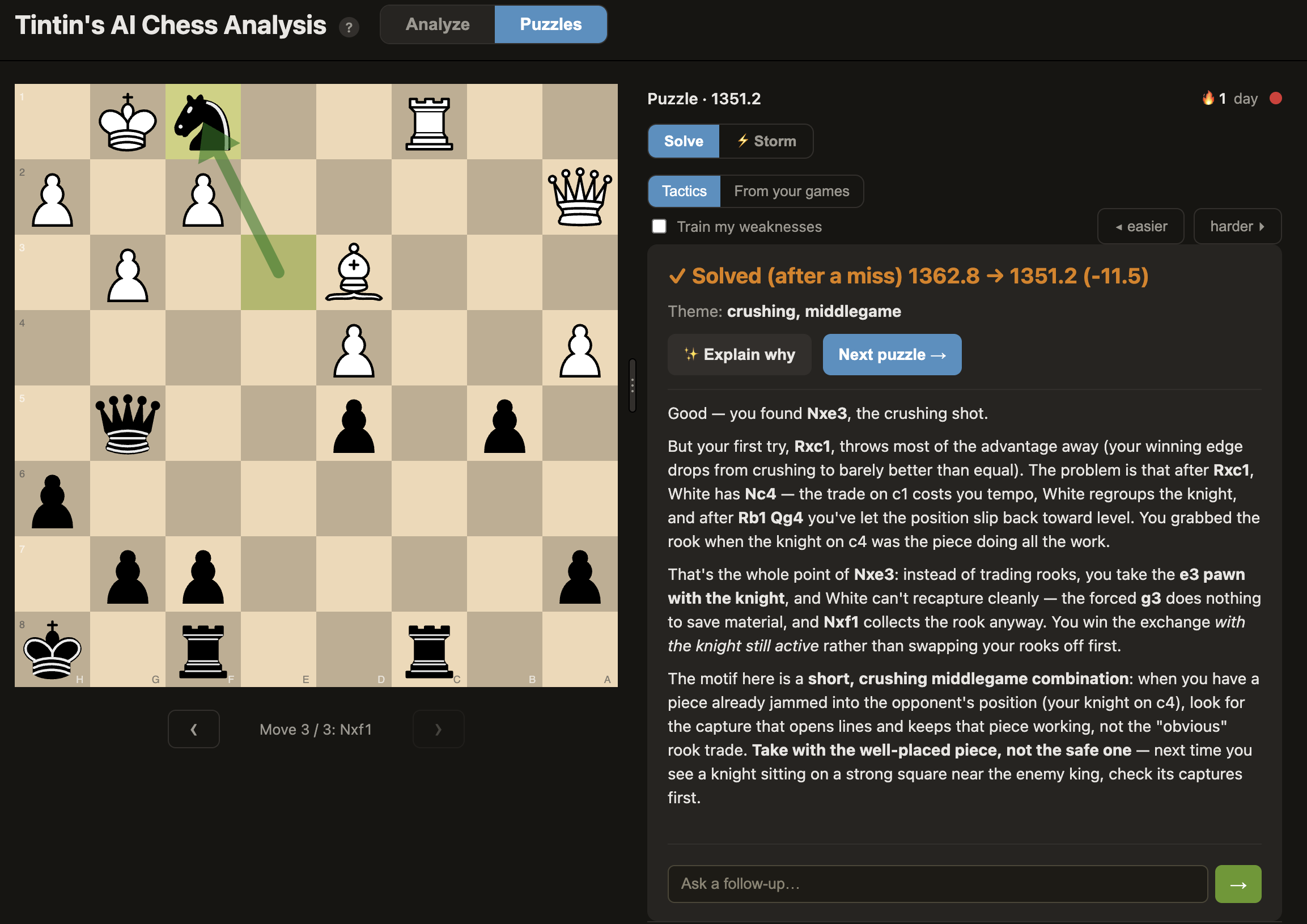
The puzzle trainer reuses the same grounding idea for tactics. Puzzles come from the CC0 Lichess database and carry a rating, and your solving rating adjusts as you go so difficulty tracks your level. Two sources make it personal: a “train my weaknesses” filter that pulls puzzles matching the motifs from your own reviewed games, and a “from your games” mode that converts your actual blunders back into puzzles to re-solve. As with game review, the “explain why” coaching is built on the engine analysis of the position, so it teaches the tactical idea (why the crushing move works, why the natural-looking try falls short) instead of just revealing the answer.
Model backend and packaging
The only part of the pipeline that reaches outside the process is the chat itself. To avoid per-token API billing, the backend shells out to the headless claude CLI so it runs on a Claude subscription with no API key, and the same interface is swappable to any model that speaks the Anthropic API (Ollama, LM Studio, llama.cpp, LiteLLM) so it can run fully local. Because the coaching quality depends only on the grounded facts, a smaller local model still gives usable explanations.
Finally, I packaged all of this (Python, Stockfish, the web server, the model glue) into a drag-to-install native Mac app plus Windows and Linux executables, with dependencies bootstrapped automatically on first launch so a user needs no preinstalled Python or Homebrew. Shipping a research-y multi-process backend as something a non-technical player can double-click was its own worthwhile problem.
The project is open source under the MIT License. See the project website for an overview, or the full write-up, installation, and code in the GitHub repository.